Tuesday, August 18, 2009

Bluetooth Phone Tools for Mac OS X

In Mac OS X Tiger, Apple's Address Book had the ability to connect with a Bluetooth phone to provide two rather nice features:

  1. It could display caller ID information for incoming calls and bring up the corresponding Address Book entry if any.
  2. It could dial out by right clicking on a phone number entry and selecting "dial using name-of-device" from the contextual menu.

In Mac OS X Leopard, these features disappeared from Address Book with nary a trace. As I began looking at what other tools might be available, I was struck by their divergent focus. Each of these tools offers a Status Bar Item with a pull down menu.

ApiMac CallerID emphasizes Caller ID. It works with Bluetooth as well as landline phones connected via modem and networked caller ID servers. Download size is 5.8 MB. CallerID offers 4 panes of preferences. $19.95 for Mac OS 10.4 or newer.

BluePhoneElite 2 emphasizes Bluetooth phone integration. This is a respected app that supports hundreds of Bluetooth phones. Its most unique feature is support for sending, receiving, and archiving SMS (which is not supported on the iPhone). It can even pipe audio to your Mac for use as a handsfree device. Download size is 8 MB. BPE2 has 8 panes of preferences. $24.95 for Mac OS X 10.4.4 or newer.

Dialectic emphasizes dialing including Internet phone systems. Its most unique feature is that it works with so many VoIP phone services. Download size is 6.3 MB. Dialectic has more preference panels and sub-panels than one can easily count. $25 for Mac OS X 10.4 or newer.
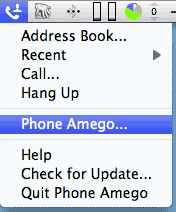
PhoneAmego4.gifPhone Amego emphasizes simple usability and uncluttered design. It provides on screen Caller ID, Address Book, Google Voice, and Bluetooth phone integration (including iPhone). SMS is supported through Google Voice. It also works with landline and VoIP phones.

Download size is 5 MB. Phone Amego has 5 preference tabs. $30 for Mac OS X 10.5 or newer.


Spotlight on Innovation

Phone Amego offers several features that have not been previously available in a single convenient package.


  • Supports Caller ID, Dialing, and Address Book integration.
  • Reports both inbound and outbound call status in a consistent heads up window. Can cancel a call in progress.
  • A single uncluttered menu bar item. Phone Amego focusses on the basic things most users want without feeling like an overstuffed sack of features.
  • One program to work with most common phones (Bluetooth cell phones, landlines, and VoIP).
  • Augmented Caller ID (Internet lookups).
  • iCal Logging. Track previous calls in your calendar.
  • Google Voice integration. Dial from any GV connected phone (indirectly). Send SMS to multiple recipients (free).
  • Easy to configure VoIP Caller ID.
  • Easy to configure Caller ID sharing. See who's calling or dial remotely from any computer (running Phone Amego) on your LAN.
  • Bluetooth Hands-Free speakerphone.
  • Simple call screening can block unwanted calls based on their Caller ID.
  • Keep notes about each caller.
  • Displays phone numbers in Address Book format.
  • Designed to maximize up time. In the rare event Phone Amego or some underlying system service crashes, Phone Amego's built-in crash reporter will display a dialog offering to send a detailed crash report to the developer, and then relaunch the application automatically after 30 seconds.


Monday, July 20, 2009

Fire Up the DC-to-AC Inverter

I recently took a family road trip and wanted a way to let my kids watch movies on DVD in the back seat. An old laptop makes a nice low cost DVD player, but the batteries are only good for a couple hours which doesn't cut it. We've all seen auto power adaptors, but with Apple's changing connectors and the need to plug-in additional devices, these can get expensive and awkward to deal with.

An elegant solution is a DC-to-AC inverter. I found a $40 inverter (Wagan Tech) that's compact, quiet, delivers 400 watts (or 150 from a cigarette lighter socket), and includes two AC receptacles that let you to plug-in whatever you want. This kept the laptop running easily, while charging a second small device as needed (Nintendo DS, cell phone, and so forth). I don't know why I didn't think of this sooner.

Monday, June 29, 2009

IPNetMonitorX Featured at TheMacBundles.com

IPNetMonitorX, my network troubleshooting tool kit for Mac OS X is one of 11 apps in the second bundle of themacbundles.com (expired 7/19/09). If you are in the market for some first rate apps, check out the list below (all for $50!)...

  • Caboodle - A lean, clean, snippet machine.
  • MailTags - Transform Apple's Mail into a powerful email organization system.
  • PrintMagic - Easily select and print just the info you want to print from any program.
  • ShutterBug - Easily share photos and stories with this easy-to-use website creation tool.
  • Trampoline - Get to your most important apps and folders faster.
  • Typinator - Automate inserting frequently used text and correcting errors.
  • Voila - Capture, annotate, and share anything you see on your screen.
  • World Clock Deluxe - Easily keep track of time anywhere in the world.

Plus these bonus apps:

  • Dock Gone - Keep the dock out of the way when you don't need it.
  • Smart Trash - Selectively delete just what you want deleted on each mounted volume.

Enjoy!

Thursday, June 25, 2009

In Search of Affordable Tethering

My family and I are planning our summer vacation in an area that does not have immediate access to high speed internet. In the old days, I used to maintain a dial-up account so I could check my Email when I was traveling and couldn't find a convenient alternative. It was slow, but it worked. My last dial-up account was $5.00 per month, and I only kept it for a few months at a time.

My latest MacBook doesn't have a built-in modem, so I've been looking for something more convenient. I considered an iPhone, but I'm much more comfortable with a laptop keyboard and screen, AT&T hasn't delivered tethering yet, and I am not thrilled about a two year contract at $70/month for the two weeks a year I really want to use this. When it became time to look for a new cell phone, I was intrigued by reports of successful tethering with T-Mobile (my preferred carrier).

After some research, I've found a solution that works reasonably well, but there seems to be some deliberate obfuscation to keep others from finding it. Here's what I learned.

At the time of this writing, T-Mobile sells one phone that can take advantage of high speed 3G tethering, a Sony Ericsson TM506. Shortly after its introduction last September (2008), users got so excited about the tethering performance T-Mobile got cold feet. As the number 4 carrier, they are frequency constrained in some areas and didn't want power users sucking up precious bandwidth needed to serve more customers (unless they were paying for that privilege). They announced that tethering was not supported and modified the TM506 firmware to hide the tethering feature.

I've always liked the user interface and Mac support on SE phones, so I began reading the forums to see if there was more to the story. Indeed there is. Tethering works just fine on the Mac if you have a corresponding data plan and it was not terribly difficult to configure. Like so many things, there are many ways of looking at this.
  1. T-Mobile lists "High speed data with EDGE" as a feature on many of their phones, and customers have been happily tethering for years. The word on the street is they wont block it but can throttle you to EDGE speeds if you exceed your data plan quota. T-Mobile cleverly redefined "unlimited web" to mean you can access any site on the web directly, but you still have a bandwidth quota depending on your plan.
  2. Now that they are rolling out 3G, T-Mobile has begun offering a separate USB Laptop Stick with its own $60/month data plan (following their rivals), but this is serious overkill for my needs (plus 3G isn't widely available yet). I just want to get my Email on those rare occasions when WiFi isn't available. Perhaps 10 days a year.
  3. T-Mobile is concerned that extensive 3G tethering could adversely effect their network, so does not want to encourage it. If you ask, they'll respond "not supported" or "don't do it."
There appears to be some deliberate obfuscation as carriers scramble to see what the market will bear. Nobody is likely to mind if you check your Email a few times a year and prefer the screen and keyboard of your laptop, but if you start pulling 100s of MB per day using 3G, this could be a problem they don't want to deal with.

The phone actually includes a T-Mobile Email client, but it's designed to charge you 20 cents per message like SMS unless you buy a messaging bundle. The phone also includes a built-in GPS receiver and Telenav service you can enable for $10/month. You are disabled from installing Google Maps or GMail for mobile directly, but you can download them to your computer, copy to your phone, and then use the File Manager to install them, or point your phones browser at wap.getjar.com and download the Java (J2ME) versions.

The SE TM506 lists for $160 (no contract price), and I added a $30/month voice plan, and $10/month unlimited web for phones data plan. T-Mobile gave me a 12% discount off my monthly plan for being a AAA member. I could have gotten the phone for $130 less by agreeing to a two year contract, but I prefer the idea that I'll keep the plan only if it's meeting my needs. I can cancel at any time and revert to pay-as-you-go for 10 cents a minute. Since I'm not under contract, T-Mobile has a little more incentive to keep me happy.

Anyway, here's what I did that worked. First, download the TM506 iSync plugin from here (this installs a Sony Ericsson modem script and iSync plugin). Next, I paired the phone over Bluetooth and selected the services I wanted (sync contacts, use phone as modem, etc.).

Network Preferences:


TM506 EDGE via Bluetooth


TM506 EDGE via USB
The drop in latency makes this noticeably faster. Adequate for checking Email or a few specific web pages, but not great for general surfing. This is what I expect to use on vacation.

TM506 3G via Bluetooth

TM506 3G via USB

The upload speed actually dropped a little possibly due to congestion. 3G tethering is quite usable in either case. Typical web pages are a few seconds slower, but not to the point of being bothersome. T-Mobile's 3G coverage is more limited than AT&T, but it's nice to see they are making progress (YMMV).

Regardless of whether you use the TM506 for tethering, it's not a bad phone. The call quality is surprisingly good, close to that of a conventional cordless phone. The screen is bright, sharp, and offers a reasonable user interface with only a modest lag in most cases. The keys are well spaced and easy to use. Reception seems good even in weak signal areas. Ring tones are loud and clear, and you can add your own by copying mp3 files to the phone.

Enjoy!

Welcome

Hello and welcome to the Sustainable Softworks blog. I started Sustainable Softworks in 1996 to build a software IP router for the Mac. At the time, it was a big leap. I'd been working at Digital Equipment Corporation for the past 14 years and had never developed for the Mac before. I fell in love with the Mac 10 years earlier, and was part of small increasingly marginalized group of Mac enthusiasts at Digital. I used my own Mac while working at DEC to thrive, developing user interface prototypes in HyperCard, and publishing technical documents, but Digital was shaking itself apart and I needed something to do.

I always wanted to run my own business, so somehow I convinced myself the experience would be worth it regardless of the outcome. Two years later, I shipped IPNetRouter which received a 1999 Macworld Editor's Choice Award and was licensed to Apple Computer as part of the original AirPort Software Base Station.

Much has happened since then, but this blog is still about using Macs, following your dreams, and one developers experience of technology from the inside out. Enjoy the ride!